
JH Mirror
Your Android phone, on your Mac. Free.
Every project. Every file. One place.

The problem I faced
My projects were scattered across Downloads, the Desktop, Documents and old external drives, in folders called final-v2 and project-new. I lost time searching, opened the wrong copy, and more than once lost the logins that belonged to a project.
What I built
A native macOS app that gives every project one organized home without moving your files, keeps project logins in the Keychain, shows Git status, and lets AI assistants organize everything through MCP.
Like most developers, I work on many projects at once: client sites, plugins, apps and experiments. Over time they ended up everywhere. When I needed one project, I often couldn’t find it, opened the wrong copy, or lost the logins that went with it.
DevShelf gives every project one clean home on the Mac:
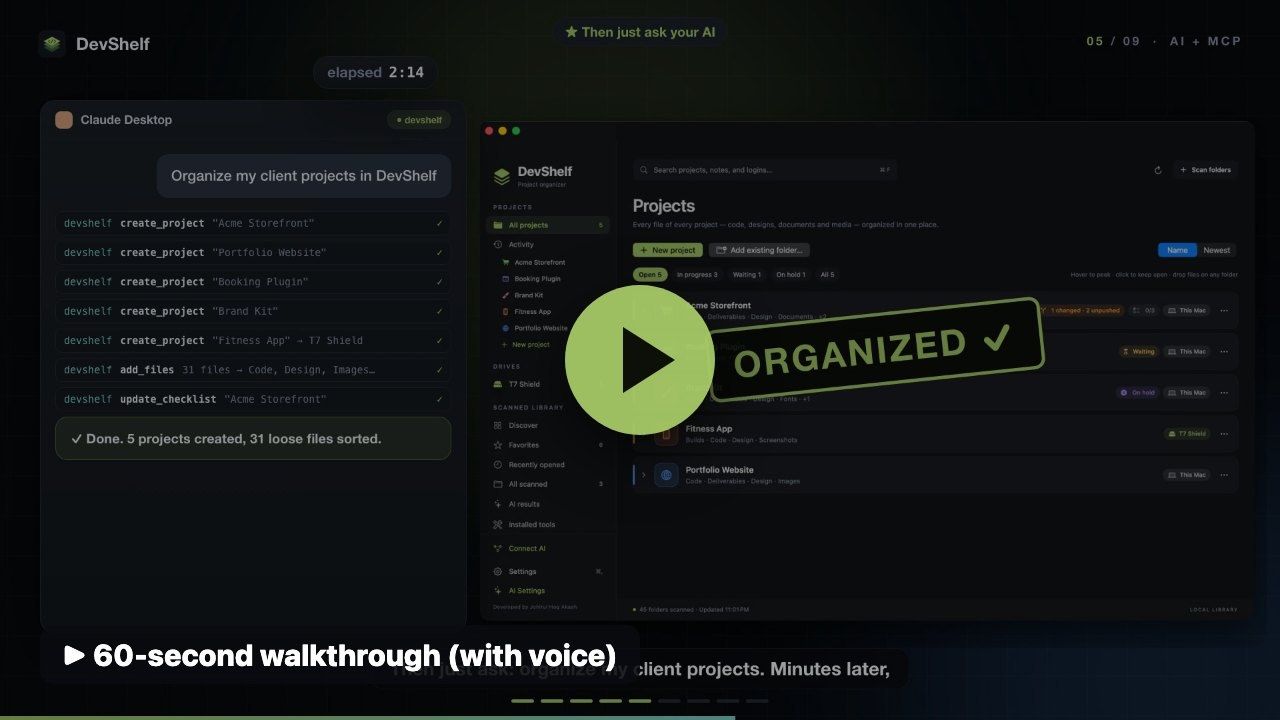
Because I spend my day with AI assistants, DevShelf includes an MCP server. Click Connect next to Claude Desktop, Claude Code, Codex, Windsurf or Cursor, then ask something like “organize my client projects”. Assistants can create projects and folders, add and sort files, find duplicates and check Git status. They only change things inside your projects, nothing is deleted permanently, and passwords are never exposed.
DevShelf is a native Swift and SwiftUI app. It watches project folders with macOS file-system events, so changes made anywhere appear within about a second. The MCP server runs from the same app and speaks JSON-RPC over standard input and output.
I designed DevShelf around my own workflow and built it with Claude, Codex and Cursor. Fittingly, those same assistants can now organize my projects through it.
Yes. DevShelf is free and open source.
No. By default it links files into a project, so originals stay where they are and use no extra disk space. You can choose to copy or move instead.
Claude Desktop, Claude Code, Codex, Windsurf and Cursor connect with one click. Any other MCP client can use the copied setup.
No. Login passwords are stored only in the macOS Keychain and are never available to assistants.
Your Android phone, on your Mac. Free.
Command a VPS, apps and APIs from one chat on your phone.
Self-hosted email warmup with AI-written conversations. $0 a month.